> ## Documentation Index
> Fetch the complete documentation index at: https://vendo-mintlify-24213046.mintlify.site/llms.txt
> Use this file to discover all available pages before exploring further.
# Embeds in your chat
> The versioned envelope a vendo_* tool returns, and the three React embeds that turn it into a rendered surface inside your own chat.
A `vendo_*` tool returns either plain data or a small versioned ref. One component turns a ref into the right surface, so your loop never has to know what an app or an approval is.
## The envelope
| Output | What happened | Fields |
| ---------------------- | ----------------------------------------------------- | -------------------------------------- |
| plain data | the guarded call executed cleanly | whatever your action returned |
| `vendo/app-ref@1` | `vendo_make` accepted a build that is still streaming | `appId`, `title`, `status: "building"` |
| `vendo/approval-ref@1` | the call parked for approval | `approvalId`, `summary` |
`status` is always `"building"`. A build that fails terminally is never wrapped in a ref, so a ref never means done.
Readers ignore unknown extra fields. Additive changes stay inside `@1`. A breaking change bumps the kind.
## Which parts are ours
Your renderer sees your tool parts and Vendo's in one list. `isVendoToolPart` is the branch, and the only place you should match on the prefix. It is true for a tool part whose name starts with `vendo_`, in both part shapes the AI SDK streams (`tool-` and `dynamic-tool`).
```tsx focus={3-5} theme={null}
import { isVendoToolPart, VendoToolResult } from "@vendoai/vendo/react";
if (isVendoToolPart(part)) {
return ;
}
// your own parts fall through to your own rendering
```
It is a type guard, so `part.output` and `part.state` typecheck inside the branch with no cast.
It answers "is this ours", not "is it finished". A part still streaming has no output, and `` renders nothing for it. Add `part.state === "output-available"` yourself only where you want to show a running one.
Put the branch anywhere among your own. It matches on the tool name, so a `dynamic-tool` part of yours is never caught by it.
## The three embeds
All three come from `@vendoai/vendo/react` — no second package. Each finds the wire on its own and polls until it reaches a terminal state.
| Component | Renders | Reaches |
| ------------------------------- | ------------------------------------------------------------------------------------ | ------------------------------------------------------ |
| `` | any `vendo_*` output, dispatched to the right embed below, or nothing for plain data | one of the two below |
| `` | the build beat while the build streams, then the live app | a mounted app, or the build's own failure with a retry |
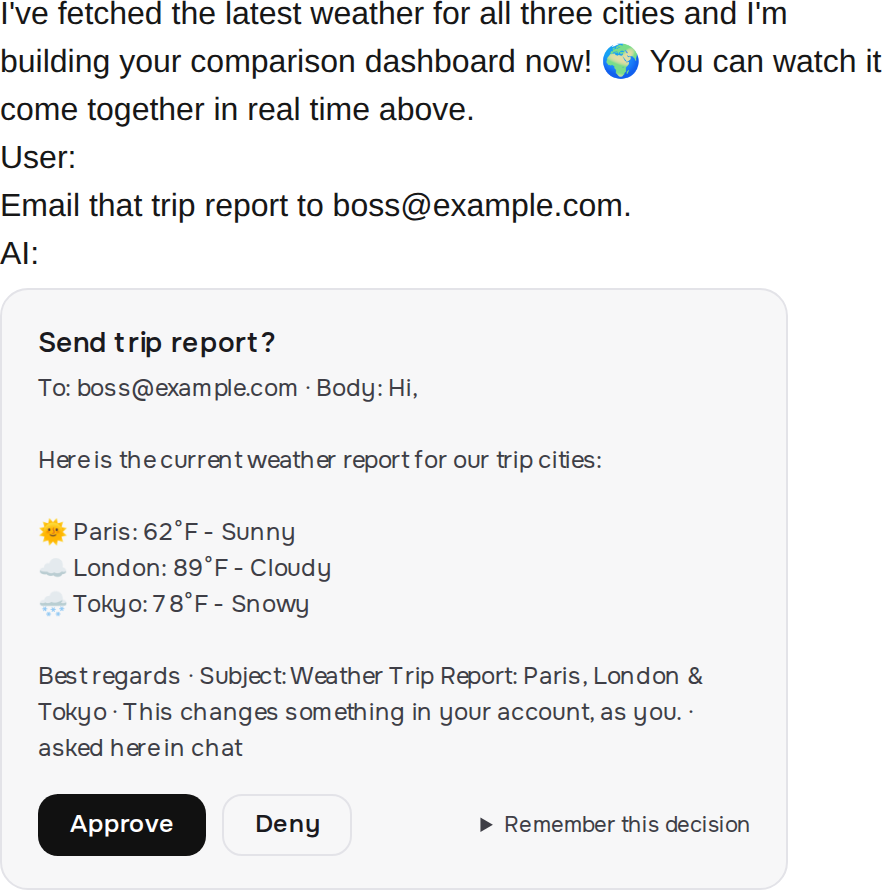
| `` | the approve or deny card, resolving in place | `"pending"`, `"executed"`, `"declined"`, `"expired"` |
None of them takes config props beyond the one shown. Wire, auth, and theme come from around them.
Use `` wherever you render a finished tool part. Reach for the other two only when you hold a ref that did not come from a live tool call — one you stored and want to re-render later.
## No setup
Drop an embed in and it works. With no provider around it, it reads the wire at `/api/vendo`, sends your host session cookie the way the browser already would, and styles itself from the `--vendo-*` tokens. Every embed on the page shares one client, so ten of them are still one connection.
```tsx app/page.tsx focus={4} theme={null}
import { VendoToolResult } from "@vendoai/vendo/react";
export default function Chat() {
// your chat, and for each finished tool part:
return ;
}
```
## The provider, when you need it
`VendoProvider` sets all of that for everything inside it. Wrap your chat once when a default is wrong for you: a wire under a base path, a client of your own, brand tokens, your host components.
```tsx app/page.tsx focus={5} theme={null}
import { VendoProvider, VendoToolResult } from "@vendoai/vendo/react";
export default function Chat() {
return (
{/* your chat, and for each finished tool part: */}
);
}
```
The [headless hooks](/reference/hooks) read the same settings, bare or wrapped, so one provider covers both.
## Approvals never block the loop
A guarded call that needs approval does not throw and does not stall your turn. The tool returns an approval ref right away, your model reads "pending, the person has to approve this", and the call parks server-side.
When the person approves in the card, the wire runs the parked call and the card resolves in place. Deny throws it away.
A call parked at the [MCP door](/outside-agents/your-own-agent) is the one exception. Approving there grants the call, and the outside agent's own retry is what runs it. The card shows its working state through that gap, then settles on "Approved — ran" once the retry spends the approval.
A pending approval expires after 60 minutes, and the card then reads "expired". Change it with `createVendo({ guard: guard({ approvals: { parkedCallTtlMs } }) })`, where `0` means never.
## Dispatching it yourself
`parseVendoToolEnvelope(output)` returns the typed envelope or `null` — exactly what `` calls. Use it server-side, or anywhere you want the branch in your own code.
```ts focus={3-4} theme={null}
import { parseVendoToolEnvelope } from "@vendoai/vendo/core";
const envelope = parseVendoToolEnvelope(output);
if (envelope?.kind === "vendo/app-ref@1") saveForLater(envelope.appId);
```
It is a runtime value, not a type, so it ships from `@vendoai/vendo/core` — add that package to import it.
Malformed output returns `null` too. The tool pack is the only writer, so a bad shape is a bug there, not something your chat should half-render.
 A pending approval expires after 60 minutes, and the card then reads "expired". Change it with `createVendo({ guard: guard({ approvals: { parkedCallTtlMs } }) })`, where `0` means never.
## Dispatching it yourself
`parseVendoToolEnvelope(output)` returns the typed envelope or `null` — exactly what `
A pending approval expires after 60 minutes, and the card then reads "expired". Change it with `createVendo({ guard: guard({ approvals: { parkedCallTtlMs } }) })`, where `0` means never.
## Dispatching it yourself
`parseVendoToolEnvelope(output)` returns the typed envelope or `null` — exactly what `