> ## Documentation Index
> Fetch the complete documentation index at: https://vendo-mintlify-24213046.mintlify.site/llms.txt
> Use this file to discover all available pages before exploring further.
# Knowledge
> Connect your product docs so the agent answers how-it-works questions from them, cites what it used, and says it does not know when they do not cover it.
Answers from your docs, with citations.
## The picture
Ask "how long do card refunds take?" and the agent looks it up instead of
guessing. The answer arrives with a **Sources** row under it, one chip per cited
document.
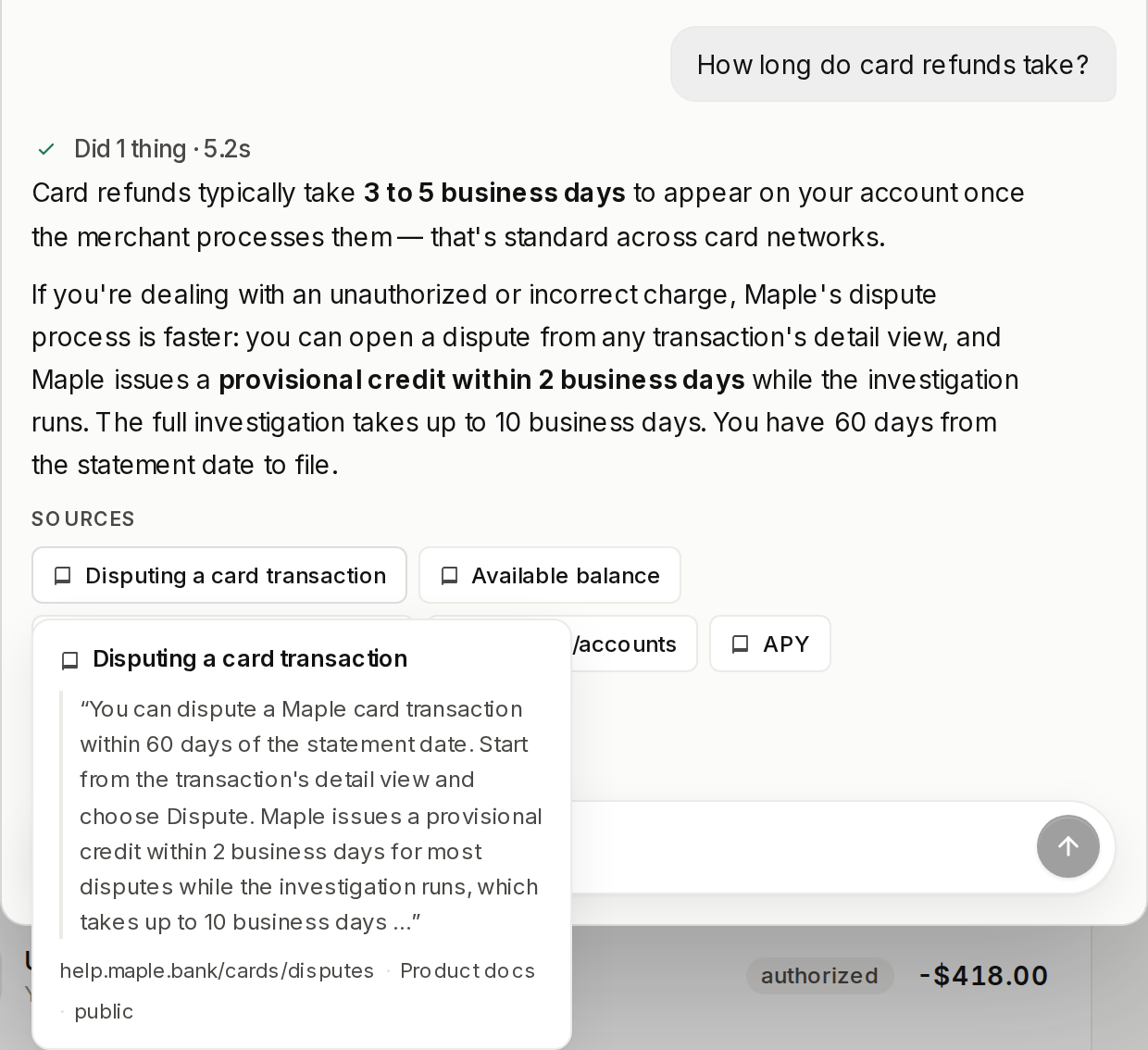 Each chip opens the snippet the answer came from. When your docs do not cover the
question, the turn says so plainly instead of inventing an answer.
`VENDO_API_KEY` is the whole setup. The `knowledge` slot fills with the Cloud
engine, and the agent picks up its `vendo_knowledge_search` tool with no code
change.
## Load your docs
Open [console.vendo.run](https://console.vendo.run/knowledge/sources) and go
to Knowledge. **Upload files** takes documents straight off your machine.
**Crawl a URL** points the crawler at a docs site you already publish.
Indexing takes a few seconds and the page does not spin while it runs.
Refresh, and the document count tells you the corpus is searchable.
Still in the Knowledge tab, open **Playground** and ask something your docs
answer. The passage under the green **Would answer** banner is the one the
agent answers from; a passage marked **Below the bar** was retrieved but not
cited.
That is the whole setup. In your app the same search tool runs on its own.
## Docs that live in your repo
If your documentation sits next to your code, push it from the repo instead of
uploading by hand.
```bash theme={null}
npx vendo knowledge add "docs/**/*.md"
npx vendo knowledge sync
# Synced: 128 upserted, 0 removed, 0 unchanged → Vendo Cloud (console.vendo.run).
```
`add` only records the source in `.vendo/knowledge.json`. `sync` is the one verb
that moves content: it upserts what changed against the hash manifest at
`.vendo/knowledge-manifest.json` and removes what vanished, so a second run over
unedited files pushes nothing.
### Say what shape a file is
`--kind` decides how a file is cut up. `docs`, the default, chunks prose at
heading boundaries. `glossary` and `api` make every heading its own chunk, which
is what makes an exact term lookup return the term rather than a fuzzy paragraph.
```bash theme={null}
npx vendo knowledge add "glossary.md" --kind glossary
npx vendo knowledge add "docs/api/**/*.md" --kind api
```
A source added with `--visibility internal` answers your own host-wired callers
only: end-user turns never see those documents, and the prompt's index does not
name them. Every verb and flag is in
[the CLI reference](/reference/cli#vendo-knowledge).
### Keep it synced from CI
Run `vendo knowledge sync` after a docs change merges, with `VENDO_API_KEY` set as
a secret. Commit `.vendo/knowledge-manifest.json` so each run only pushes the
documents that changed.
Each chip opens the snippet the answer came from. When your docs do not cover the
question, the turn says so plainly instead of inventing an answer.
`VENDO_API_KEY` is the whole setup. The `knowledge` slot fills with the Cloud
engine, and the agent picks up its `vendo_knowledge_search` tool with no code
change.
## Load your docs
Open [console.vendo.run](https://console.vendo.run/knowledge/sources) and go
to Knowledge. **Upload files** takes documents straight off your machine.
**Crawl a URL** points the crawler at a docs site you already publish.
Indexing takes a few seconds and the page does not spin while it runs.
Refresh, and the document count tells you the corpus is searchable.
Still in the Knowledge tab, open **Playground** and ask something your docs
answer. The passage under the green **Would answer** banner is the one the
agent answers from; a passage marked **Below the bar** was retrieved but not
cited.
That is the whole setup. In your app the same search tool runs on its own.
## Docs that live in your repo
If your documentation sits next to your code, push it from the repo instead of
uploading by hand.
```bash theme={null}
npx vendo knowledge add "docs/**/*.md"
npx vendo knowledge sync
# Synced: 128 upserted, 0 removed, 0 unchanged → Vendo Cloud (console.vendo.run).
```
`add` only records the source in `.vendo/knowledge.json`. `sync` is the one verb
that moves content: it upserts what changed against the hash manifest at
`.vendo/knowledge-manifest.json` and removes what vanished, so a second run over
unedited files pushes nothing.
### Say what shape a file is
`--kind` decides how a file is cut up. `docs`, the default, chunks prose at
heading boundaries. `glossary` and `api` make every heading its own chunk, which
is what makes an exact term lookup return the term rather than a fuzzy paragraph.
```bash theme={null}
npx vendo knowledge add "glossary.md" --kind glossary
npx vendo knowledge add "docs/api/**/*.md" --kind api
```
A source added with `--visibility internal` answers your own host-wired callers
only: end-user turns never see those documents, and the prompt's index does not
name them. Every verb and flag is in
[the CLI reference](/reference/cli#vendo-knowledge).
### Keep it synced from CI
Run `vendo knowledge sync` after a docs change merges, with `VENDO_API_KEY` set as
a secret. Commit `.vendo/knowledge-manifest.json` so each run only pushes the
documents that changed.